

YouTube videos and data privacy: what to consider
There is an important connection between YouTube videos and data security since the General Data Protection Regulation (GDPR) of May 2018 at the latest. YouTube Videos to your own website is a very popular function, but the Data security may not be lost from sight. The platform YouTube sets certain cookies for web tracking, which are stored in the browser of the website visitors.
Why these cookies are considered problematic within the scope of GDPR and what you need to consider in order to protect the privacy of your website user, we show you in our blog post.
Embed YouTube videos – what happens in the background?

© Thomas Pajot stock.adobe.com – ID #28137752
Embed YouTube videos is a very sought-after and at the same time useful possibility, because this often makes it easier to clarify matters that are described on your own website. Furthermore, videos loosen up the external appearance and bring variety into your own internet presence. However, if you want to embed YouTube videos, make sure that this is implemented in compliance with data protection.
By integrating the videos, various connections to servers of the Internet giant Google are established: This saves several cookies in your website user’s browser. Finally, information is sent to YouTube as well as Google advertising service. All this happens before the visitor has even played the video. So it is enough for the Internet user already to visit a website that contains embedded YouTube videos.
The correct procedure is therefore fundamentally important here: YouTube embed videos is allowed, but must be implemented in such a way that the guidelines of the DSGVO are adhered to.
Embedding videos via the extended data protection mode
One way to embed a YouTube video on your own page is to use extended privacy mode. To do this, first select the video you want to embed from the YouTube platform and click “Share”:

© Screenshot by Metamove — Share a YouTube video
In the next step, you have to click on ” Embed” .
In the reopening window, you must now set hook at “Enable Advanced Privacy Mode to maintain the guidelines of the GDPR. By this option, you will obtain that no information from your website visitors is accessed or forwarded. Only by active clicking on the video would it be possible to forward user information.
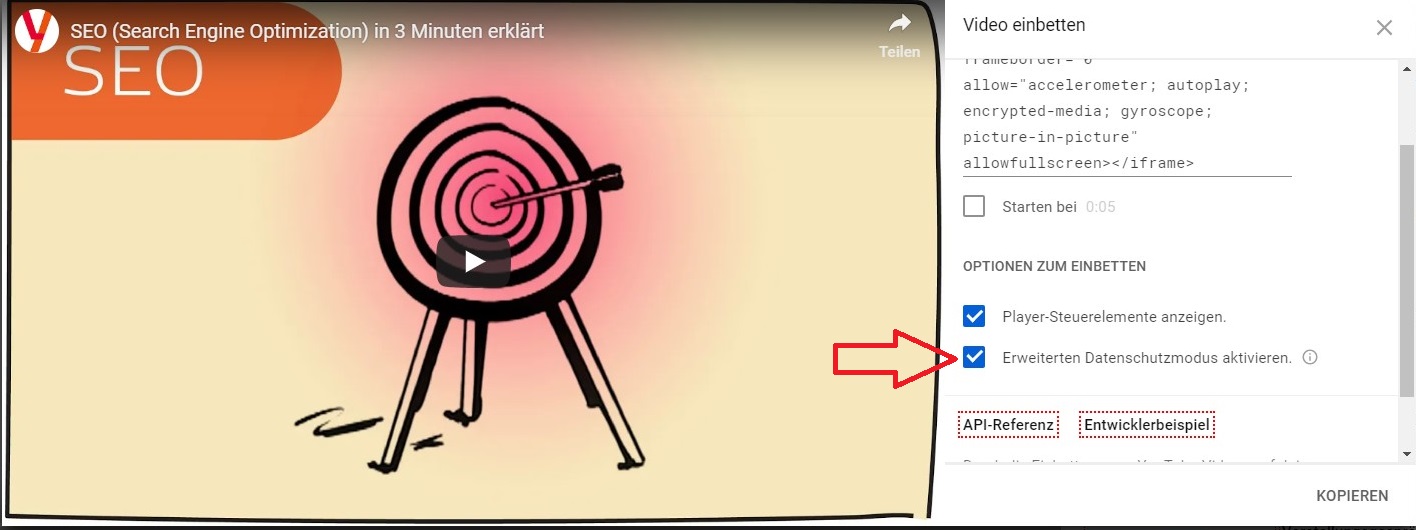
© Screenshot by Metamove — “Extended Privacy Mode”
Website operators can easily verify whether an embedded YouTube video is compliant with data protection or not. If the extended privacy mode is activated, the embedding code changes: “youtube.com” becomes “youtube-nocookie.com:
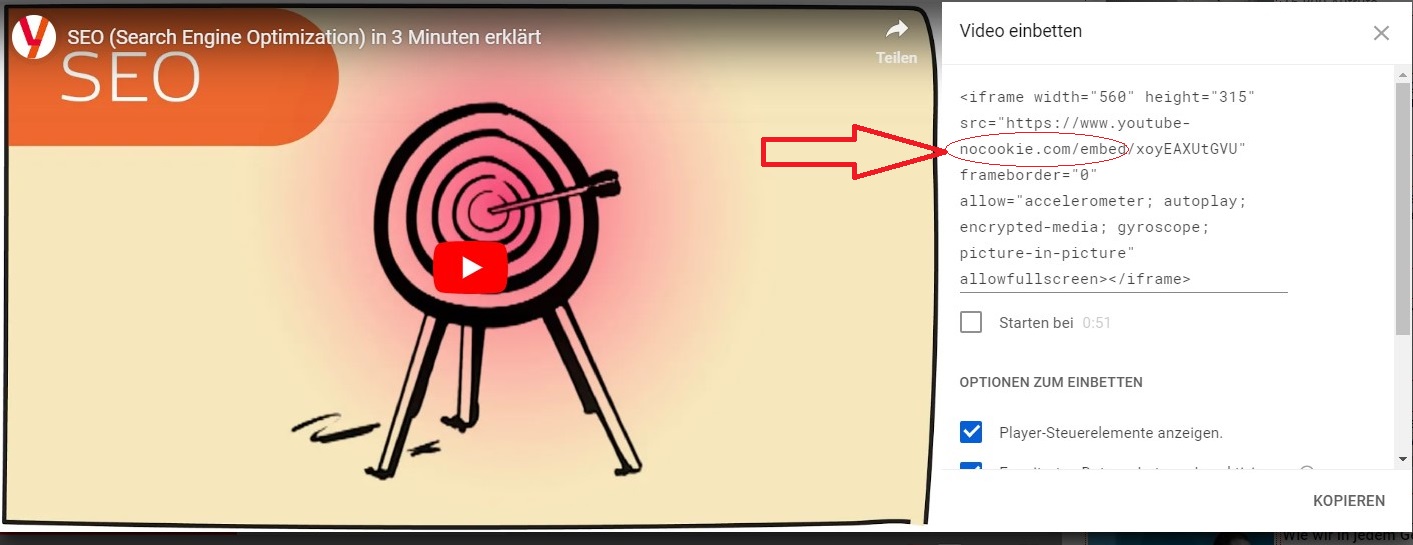
© Screenshot by Metamove — modified embedding code
This way you can easily reduce legal risks. Therefore, we advise you to use this simple click when embedding YouTube videos.
Privacy-compliant WordPress plugins – an alternative from the third party
Many may wonder why it is so important that videos are integrated in compliance with the GDPR. The deeper sense behind this is that YouTube cannot “track” in the background, which users visit your website, on which YouTube videos are embedded. This is basically also very useful.
Therefore WordPress offers another possibility to embed a YouTube video using a special WordPress plugin. You can download this plugin here: “WordPress Embed videos and respect privacy
Another option is offered by the WordPress plugin “YouTube LyteThis plugin prevents the loading of integrated videos before use and scores at the same time with another advantage: It shortens the loading times Your website.
This plugin is currently also being further developed. Additional functions are to be added, through which a video embedding is to be implemented even more data protection-compliant.
Even with YouTube Lyte, tracking only starts when the visitor actively presses the Play button.
After the YouTube Lyte plugin has been installed, further settings can be made.
Our tip: With the item “Insert microdata”, you should choose “Yes”: This is additional information that is relevant for Google so that your content can be displayed even better in search engine search results.
Important:
The integration of the video is done here via YouTube video URL and not via the part and embed function.

© Screenshot by Metamove from WordPress YouTube Lyte Plugin.
If difficulties occur during the integration of the plugins or if the presentation of the website changes by activating the plugin, you can contact the experts of Metamove at any time. We will help you specifically: Please send us a request via our online contact form.
However, data protection-compliant videos can not only be embedded using WordPress plugins. In Joomla, for example, the JCE Editor Pro can provide a remedy and there are corresponding features for Elementor.
Taking care of compliance with the GDPR for the private website itself
If you as a website operator, keep your authority over data processing completely and do not want to go into any legal gray zones, there is another way to embed YouTube videos in compliance with data protection.
In this case, you should insert a self-created preview image into the page. Behind the picture, the content of the video is stored. However, it will only be loaded when the user actively accesses it. However, make sure that the copyright of people uploading the video to YouTube is not violated if you create a preview image.
An important step in the context of data security – supplementing the privacy policy
Since May 2018, every website that is online must contain a correct privacy policy: This regulates in detail how the data of website visitors is handled. Ideally, it should be written in Privacy Policy that after playing YouTube videos, user information is transmitted to YouTube.
Please note that in this context that our blog article is not valid legal advice. In case of doubt, you should contact a legal expert here! In addition, our blog article gives the current state of things. Plugins and integration options are in constant development, so that the procedures described here can also change.
So there are some ways to protect the privacy of your website visitors. However, existing plugins are being further developed so that there is currently no fully sophisticated all-round solution to embed YouTube videos in compliance with data protection.
Conclusion – how to integrate YouTube videos in compliance with data protection
- Always use the YouTube extended data protection mode
- Pay attention to copyrights
- Inform your users about the use and processing of data
- Customize your privacy policy accordingly
- Use current plugins
- Regularly inform yourself about legal regulations
- Update your old embedded YouTube videos.
Schreibe einen Kommentar zu "YouTube videos and data privacy: what to consider"