

Advanced Content Update Refresher Plugin: Automate Structured Content Updates in WordPress
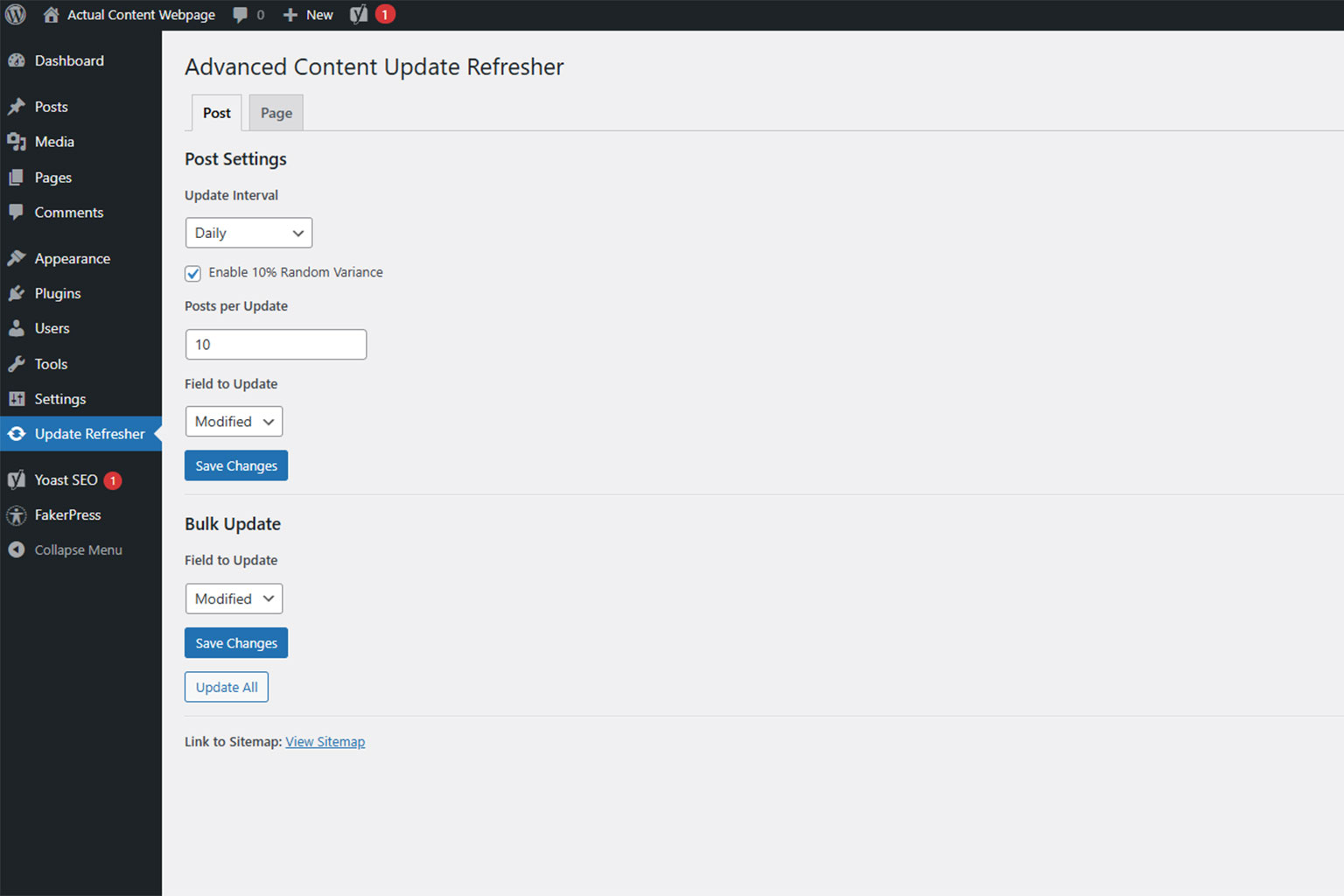
As the number of posts, pages, and custom post types increases, the organizational effort required for structured content maintenance in WordPress grows significantly. Evergreen content and other valuable resources remain factually relevant, but gradually lose visible freshness over time — while daily operations often leave no capacity to manually revise and update hundreds or thousands of items in a targeted way.
This is exactly why Advanced Content Update Refresher was developed: The plugin allows you to carry out timestamp updates in a structured, controlled, and post-type-specific manner. As a result, you organize content maintenance processes in WordPress much more efficiently — without complicated workarounds or heavy automation setups.
Since many SEO plugins generate their XML sitemaps directly from WordPress post timestamps, updates are automatically reflected in the sitemap. You can submit this sitemap to Google via Google Search Console. Updated timestamps signal to the crawler that content should be reviewed again — especially within systematically maintained evergreen archives.
Important: The plugin is not a ranking hack. It does not replace real content revisions. It supports you in cleanly automating maintenance and update processes in WordPress.
Who Is Advanced Content Update Refresher Suitable For?
Advanced Content Update Refresher is particularly useful for:
- Blogs and magazines with many articles where older posts should be regularly refreshed.
- Knowledge sections, glossaries, guide archives, and content hubs with long-term relevance.
- Corporate websites with blog + landing pages + custom post types (e.g., “references,” “guides,” “glossary,” “projects”).
- Website operators who want to establish structured maintenance routines: “X items per week” instead of “whenever there is time.”
The Key Benefits of Advanced Content Update Refresher at a Glance
1) Direct Integration into the WordPress Sitemap (Even Without an SEO Plugin)
Advanced Content Update Refresher works directly with native WordPress timestamps (post_date and post_modified). As a result, updates are automatically reflected in the built-in WordPress XML sitemap — even if no additional SEO plugin is installed.
If you have submitted your sitemap in Google Search Console, Google is informed in a structured way about updated content. Updated timestamps can signal to the crawler that pages should be revisited.
The plugin is also fully compatible with common SEO solutions such as Yoast SEO, Rank Math, All in One SEO, and Google XML Sitemaps, since these plugins also generate their sitemap data directly from WordPress post timestamps.
2) Post Types Are Automatically Detected (Excluding Attachments)
The plugin automatically detects posts, pages, and public custom post types. Attachments are excluded.
This allows you to work cleanly even in complex setups without manually configuring every post type.
Typical SEO configurations are also respected:
If a post type is set to noindex in Yoast SEO, Rank Math, or All in One SEO, it will not be included in automated updates.
3) Cron Scheduling per Post Type – Separate Control Instead of “One Size Fits All”
Each post type receives its own scheduling via WordPress WP-Cron.
You can define per post type:
- Interval (e.g., weekly or custom days)
- Quantity per run
- Update field (Modified or Published)
- Optional random variance
Tip: If you want a 6‑month interval, simply set Custom Days = 180 (or 182/183 depending on your logic).
4) Quantity per Run Is Adjustable
You can define how many items per post type should be updated per run. This allows you to precisely control server load and update speed — for example:
- 10 per day for steady maintenance
- 50 per run for faster rotation
5) You Decide Which Timestamp Is Updated
Per post type, you choose whether the plugin updates:
- The Modified date (recommended), or
- The Published date
Especially for evergreen maintenance, the Modified date is often the more meaningful option because it aligns better with real update processes.
6) Optional Random Variance for More Natural Distribution
An optional random variance prevents updates from always occurring at the exact same minute. Timestamps are therefore distributed more naturally and do not appear artificially generated.
7) Bulk Update with Progress Indicator (Also for Large Websites)
For larger websites — even with 10,000+ items — the plugin offers a staged bulk update feature. This:
- Reduces timeout risks
- Keeps server load manageable
- Displays transparent progress
- Runs more stable than a full update in a single step
8) Sitemap Link Directly After Saving
Below the save button, the plugin displays a direct link to the active sitemap (e.g., sitemap_index.xml or sitemap.xml).
This allows you to immediately verify whether the sitemap is accessible and whether timestamp changes are reflected correctly.
If no change is visible, fully reload the page once:
- Windows: Ctrl + F5
- Mac: Cmd + Shift + R
9) Full Multilingual Integration
The plugin includes a complete i18n structure with .po, .mo, and .pot files and is fully prepared for multilingual installations.
10) Clean Uninstallation
Upon uninstalling, the plugin completely removes its own settings and does not leave unnecessary data behind in the system.
How Does the Plugin Work Technically?
Advanced Content Update Refresher updates either the Published date or the Modified date, depending on your settings. WordPress and SEO plugins such as Yoast SEO, Rank Math, or All in One SEO generate their sitemap data directly from these timestamps and automatically reflect corresponding changes.
Updates are executed per post type and in configurable batch sizes — giving you full control over performance, scope, and maintenance logic.
Important to know: The plugin uses the native WordPress WP-Cron system. These are not real server-side cron jobs but a scheduling system triggered by page visits. This means: A website without regular traffic or external calls will not automatically execute scheduled tasks.
Setup: How to Get Started Properly
- Install & activate the plugin
- Open the settings (tabs per post type)
- Define per post type:
- Interval (e.g., weekly or custom days)
- Quantity per run
- Update field (Modified or Published)
- Optional: Activate random variance
- Save → Check the sitemap link
If no change is visible, reload the page completely
(Windows: Ctrl + F5, Mac: Cmd + Shift + R) - Optional: Start bulk update manually (e.g., for a restart or initial rotation)
Practical Content Maintenance Tips
- Do not start everything at once: Begin with one post type (e.g., blog) and a moderate quantity per run. This keeps server load and update logic under control.
- Use Modified instead of Published: For serious and sustainable content maintenance, the Modified date is usually the better choice because it reflects real revisions.
- Improve content itself: Regularly revise and optimize your content. Use Advanced Content Update Refresher as a structured support tool — combining editorial quality with clean technical implementation.
Download
👉 Download Advanced Content Update Refresher Plugin for WordPress
The source code and version history are additionally available on GitHub:
👉 https://github.com/metamove-seo/advanced-content-update-refresher/
Schreibe einen Kommentar zu "Advanced Content Update Refresher Plugin: Automate Structured Content Updates in WordPress"