

Automating marketing data integration to keep customer data consistent
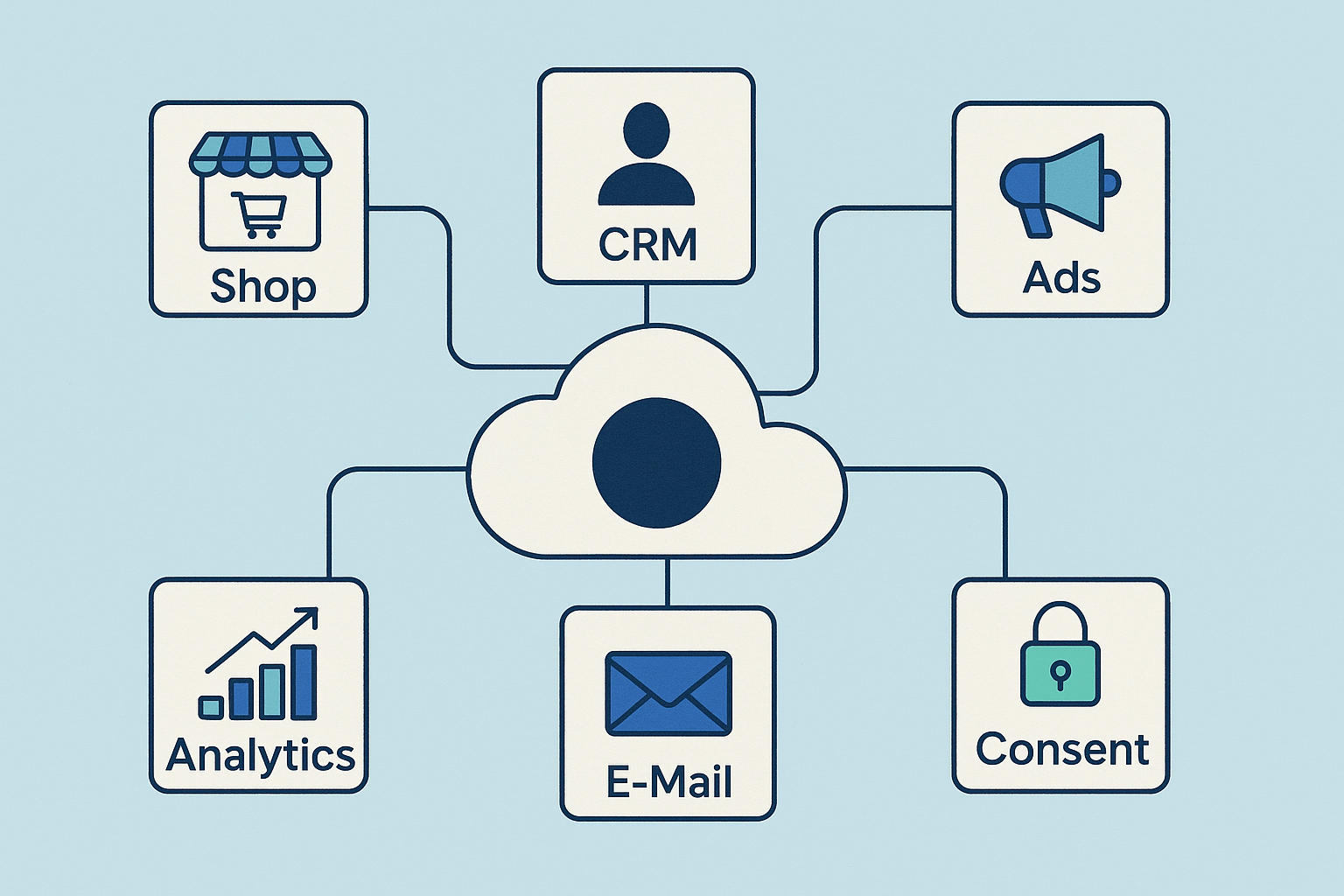 Marketing today creates a lot of customer data – but they rarely end up where they really are needed. A contact buys in the shop, registers for the newsletter, clicks on a Google ad, opens a mailing, maybe asks a support question.
All these data exist, but they often live isolated in different tools.
Typical everyday life in many companies:
- The shop knows what was bought – but the newsletter tool does not.
- The CRM sees the contact – but without product or campaign data.
- Google Ads evaluates target groups – but without real sales information.
- Support tools know problems – marketing never learns about it.
- Leads are created twice because Excel lists are uploaded manually.
The result:
- Kampagnen are played out on “wrong” target groups
- . Discounts land with regular customers instead of new customers
- Distribution calls leads that are not ready to buy
- Advertising budget is wasted because data are unclean
This is exactly where automated marketing data integration helps.
It connects systems without CSV export, without copy errors, without manual lists.
Data flows clean, up-to-date and uniformly from system to system – completely automatically.
This is the only way target groups, triggers, reporting and personalization really work reliably.
1) Why data integration solves a business problem — no technology issue
When it comes to data linking, technology jargon like ETL, API or CDP immediately falls. In reality, this has little to do with IT, but a lot to do with sales.
Companies lose money because their systems don’t talk to each other.
Practical example: New customer discount without data matching
An online shop offers “10% discount for new customers”.
Because the shop is not synchronized with the CRM, the system does not recognize who has bought before.
Result:
- Cash customers collect new customer discount
- . Contribution to cover decreases, campaigns become unprofitable
- . Regular customers don’t feel valued
- ROAS looks good, but doesn’t bring any real profit
What happens to cleanly integrated data?
When systems talk to each other, marketing changes automatically:
Data integration does not mean “to collect more data.”
🔥 It means using existing data intelligently to sell better.
2) What happens without data integration? (Terre real case)
Without data flow between shop, CRM and advertising platforms, marketing works blindly.
Data is collected, but they land in isolated silos.
This leads to wrong decisions — not because marketing works badly, but because the data does not fit together.
Typical data problems without integration
Typical errors without data integration
Double or false customer records
- same person appears several times in the CRM
Result: She gets wrong discounts or contradictory offers.
Shop knows who bought – Ads not
- Google & Meta continue to aggressively promote products, although the customer has already purchased
Unnecessary advertising costs & annoying target group
Residence customers are treated as new customers
- Advertising campaigns reach people who have long been customers
They get new customer offers, although they would pay more
Analysis is far too late
- Because data must be merged by CSV import
Budget will only be corrected after weeks
How expensive is that really?
A campaign with 10 € CPA looks profitable — until you realize that 40% of the leads were existing customers.
In truth, the new customer CPL was 16–18 €.
Marketing looks good, but the company loses money.
3) What brings data integration in concrete terms? (Before → After)
Data integration not only changes technology – it changes marketing decisions.
The difference is immediately noticeable in everyday life:
Before: Mass emails
All customers get the same newsletter because hardly anyone knows who bought last.
🔁 Afterwards: Segmented emails
Purchase history, shopping cart, returns, product interest → automatically determine which mail will be sent.
A buyer gets tips for use + suitable supplement products, no start discount.
Before: Buyers receive new customer advertising
Because the shop knows who bought, but not ads & e‑mail system.
🔀 After: Existing customers receive cross-sell/up-sell
The system recognizes buyers and immediately steers budget away to existing customer marketing.
If you have bought headphones, you will see cables/adapters – not the same headphones.
Before: ROAS only evaluates clicks and leads
Campaigns are optimized, although they mainly reach existing customers.
🎯 Afterwards: ROAS is based on Customer Lifetime Value (LTV)
Budget automatically shifts to target groups that are profitable in the long term.
The campaigns do not optimize to “cheap leads”, but to valuable customers.
Previous: Monthly CSV exports
Marketing is waiting for reports, data must be cleaned up, sorted, imported.
⚙️ After: Real-time synchronization
Shop, CRM and Ads exchange data without manual effort.
The decisions are based on current figures – not past values.
the previous: Manual errors everywhere
Typing, outdated fields, double records, wrong attributes.
✔的 After: Automated data verification
Duplicate, format error data, missing IDs → are automatically cleaned up.
Before/after effects of data integration
In short:
Data integration not only ensures “more data”, but also clear, automatic marketing decisions.
4) How does data integration work? (without tech-sulphur)
Data integration sounds like IT buzzwords, but in truth it is as simple as water pipes:
Data must be collected , cleaned, unified and distributed. This is done by four building blocks – explained here intelligibly:
ETL – like a water pipe for data
ETL stands for: Extract → Transform → Load
Without ETL = everyone carries water in a bucket.
With ETL = the line runs automatically.
normalization – “all speak the same language”
When tools have different spelling methods, the system no longer recognizes people and products correctly.
Examples from practice:
Without normalization: Target groups are faulty.
With normalization: campaigns hit the right buyers.
Deduplication – Duplicates are merged
Two orders, two newsletter subscriptions, but one customer – not three profiles.
Result: no double discounts, no double mails, no wrong segments.
“Identity Resolution” – “This is the same person”
This system recognizes:
The one who…
- buys in the shop,
- clicks in the newsletter,
- a support ticket writes,
- and responds to social ads,
… is one and the same person, not four records.
⚠️ Without Identity Resolution: you value target groups.
💰 With Identity Resolution: Marketing makes decisions based on real customers.
5) Which tools fit which company? (without overkill & data risks)
Not every company needs a “Enterprise Stack”. how many systems need to be synchronized at all.
Small companies need to save costs.
A medium-sized enterprise needs scalability.
Enterprise needs full privacy control + international standards.
Practice-oriented tool recommendation
Important:
The actual magic does not happen in CRM – but in middleware, which lets systems talk to each other.
- Middleware (Make or n8n) ensures that all systems run clean – no matter which provider is used.
ETL, Normalization, Deduplication & Identity Resolution
6) Examples of automated data workflows (real marketing results)
Automated data integration is not an “IT project”. It brings directly measurable results in marketing.
Here are four workflows that immediately secure sales or reduce costs:
Reactivation based on buying behavior (no spam, but timing)
If customers do not buy 60–120 days, they are not “blindly advertised”, but addressed based on actual needs:
Result: Less unnecessary discounts – more sales from returnees.
Control advertising budget based on customer value (LTV) – without gut feeling
Not every customer pays off. Data integration enables automated budget control:
的 Result: Budget flows to where real profitability arises.
Consent-dependent campaigns (GDPR + performance)
No privacy risk, no lost performance:
the Tools like Usercentrics or OneTrust send the status automatically to Ads & CRM so that it is not wrongly personalized.
No new customer discounts for existing customers (classic loss killer)
Without data integration the following happens:
“New customer discount” is available to existing customers and they like to use it.
With automated data linking:
. Result: No waste of discounts + better recommendations.
7) GDPR & Consent: What is allowed, what is not?
Data integration always meets data protection. Good news:
Many marketing automations are legally possible – as long as it is clear what data is used for.
Data protection is not a marketing brake — it provides clear rules, clean data and legally secure automation.
Important note (no lawyer text):
This section does not replace any legal advice. DSGVO requirements depend on tool selection, hosting location, consents and individual business models.
A specialised data protection lawyer should be consulted for complex or cross-border cases.
8) Common errors & how to avoid them
Many companies start data projects with expensive tools – and only later notice that the basics are missing. With marketing data integration, it is almost always these same five errors which burn unnecessary budget:
Buy Tools before the problem is clear
Example: A CDP is introduced, although only CRM
✔的 First define use cases , then select suitable tools.
‘Collect all data instead of using relevant data’
More data = more chaos if no one uses it.
● Focus on Purchase data, consent, contact points, customer value .
No Identity Resolution → a customer has 3 profiles
Newsletter mail + shop account + support ticket = separate persons.
✔的 Stitching via e‑mail or customer number as uniform ID.
Don’t synchronize Consent → DSGVO risk
Example: CRM allows email advertising, newsletter tool but not → third party advertising without consent.
✔的 A central consent status for all systems.
No regular data hygiene (quality is getting worse instead of better)
Errors spread automatically into all tools.
✔的 Automated exams + deduping jobs + format checks (phone, country, e‑mail).
Meaning:
Automation scales data quality — or data chaos.
It does not start big, but clean.
9) Why data integration strengthens marketing — not IT
Many companies believe that data integration is an “IT project”. In reality, it mainly changes marketing results and sales indicators.
When data is integrated, better decisions are automatically made in marketing:
✔的 Advertising becomes more precise
Example: Buyers of product A no longer receive advertising for the same product, but targeted cross-sells.
→ Less scatter loss, higher conversion rate.
✔的 Selling emails instead of informing
Newsletter is not a mass shipment, but based on purchasing behaviour, baskets and customer value.
→ More purchases — without more traffic.
● Budget is controlled by value, not by clicks
Campaigns with “cheap leads” are no longer preferred if these leads do not buy later.
→ Campaigns are rated according to LTV ROAS, not CPC.
✔the inventory customers are treated profitably
Buyers get rewards, low-purchaser reactivation, bargain hunters don’t get a new customer discount.
→ Instead of giving away money, the company earns money to existing customers.
Core idea:
Data integration will not bought to connect systems, but to Making marketing more profitable.
“No more data,” but “more data turnover.”
10) Automated data quality in everyday life (instead of one-off major projects)
Data integration rarely fails because of technology — but because no one keeps it continuously. The good news: No one has to “play data keepers”. Small, automatic rules are enough to keep systems clean in the long term.
These 10-minute checks will take care of the automation for you:
🔁 Automatically check duplicates
Rule: Merge the same email, phone number or cookie ID →
✔的 Result: a customer, a profile, clear history.
Bounce filter for email tools
Automatically mark and block any inaccessible email →
✔的 No futile shipping + better delivery rate.
Normalize address & country codes
“DE‑, “GER‑, “Germany‑, “Germany- → always “DE-
Without this mapping, segmentations can be totally flawed.
“Filter fake” contacts
Rules: Dismissal domains, missing names, test emails → automatically tag & exclude
● Prevents budgets from flowing to bots and test users.
Keep Consent status synchronous
If opt-in is revoked → immediately lock in ALL systems
✔the protection against warnings & data protection errors.
Automated quality report
Weekly: number of duplicates, lack of consent, unclear origin
● No guesses — Marketing sees numbers at a glance.
Key point:
Data quality is not created by a unique “cleanup day”, but by small rules that constantly run. That’s exactly why automation is worth it.
FAQ: Frequently asked questions about marketing data integration
- What does marketing data integration mean?Marketing data integration means that data from different systems – e.g. shop, CRM, newsletter tool, analytics and ads platforms – are automatically merged.
Systems exchange information in real time
The duplicates are reduced and profiles merged
Marketing can access a common database instead of working with CSV exports - How does data integration differ from “just collect more data”?Collecting more data does little if they are in silos or faulty.
Data integration does not mean “save everything,” but rather:
Use only relevant data (purchases, consents, customer value)
To merge data from different sources
Prepare information so that campaigns, workflows and reporting really get better - What are the benefits of automated data integration for marketing?The most important advantages are directly measurable:
More precise campaigns through clean target groups
Less scatter loss, because existing customers are treated specifically
Better email performance through segmentation by behavior and value
Less manual work with exports, imports and list maintenance
In the end, it is not IT that gets stronger, but marketing and sales. - What systems should I connect to each other first?The biggest lever is usually created in this order:
Connecting the shop or lead source to the CRM
Linking CRM with newsletter or marketing automation tool
Synchronize CRM and purchase data with Google Ads / Meta Ads
Integrate Consent management to ensure that consents are consistent everywhere
This results in a clean data flow step by step instead of a large, risky big bang project. - What role do ETL, normalization, deduplication and identity resolution play?These terms describe the building blocks of data integration:
ETL: Get, prepare and load data into other systems
Normalization: Uniform formats (e.g. countries, telephone numbers)
Deduplication: Find and merge duplicate records
Identity Resolution: recognize that shop purchase, newsletter click and support ticket belong to the same person
The advantage: Marketing works with a clear customer image rather than with fragments. - What is to be observed with GDPR and consents?For legally secure marketing data integration:
Tracking and personalized advertising only with valid opt-in
The legitimate interest must be documented when it is used
A central consent status should be synchronous in all systems
In complex cases, a legal examination should be carried out
The information given here is not legal advice, but a general orientation on how data integration can be thought in compliance with data protection. - How do I practically start with marketing data integration?A useful start looks like this:
Define concrete use cases (e.g. no new customer discounts for existing customers)
Capture existing systems (shop, CRM, newsletter, ads, consent tool)
Build up small, clearly defined sync routes (e.g. shop → CRM → newsletter)
Check data quality (duplicates, formats, consent)
Set up reporting so that the effects of integration can be measured
This is how data workflows grow with business – not the other way around. - What typical errors should I avoid when integrating data?Common stumbling blocks are:
Buying tools before it is clear which problems should be solved
To collect too much data without using it meaningfully
No Identity Resolution so that a customer appears multiple times in the system
A missing consent sync between CRM, newsletter tool and Ads
It is better to start with a few well-defined automations – and gradually expand them.
Schreibe einen Kommentar zu "Automating marketing data integration to keep customer data consistent"